Web: October | 2026

Hello,
Stay up to date with the latest features and enhancements we’ve just launched on the Dynamox Platform.
Check out what’s new and leverage these updates to their fullest!
NEW | Notification preferences: you decide how you’re notified
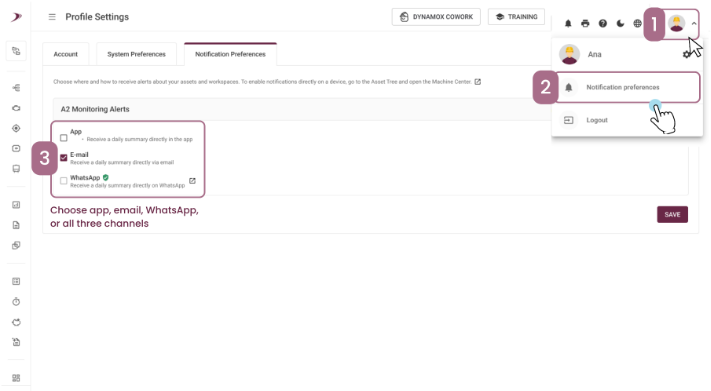
You can now choose where you want to receive platform alerts. Everything is in one place: the new Notification Preferences tab in your User Profile.
In this first phase, you can receive summarized notifications about A2 monitoring alerts through three channels: the App, email or WhatsApp. Soon, other information currently shown in different areas of the platform will also be centralized in this tab.
Important: To receive alerts via WhatsApp, register and verify your number under Profile Settings > Account > Mobile Phone. Then choose where you’d like to receive notifications.
If you choose App notifications, you can view them through the notifications icon (🔔) in the Dynamox App.
If your company requires corporate numbers, the admin user can manage the numbers registered by users in User Management.
IMPROVEMENTS | Analysis Plan: more flexibility, control and speed
The Analysis Plan has received a set of improvements that match the way your team works.
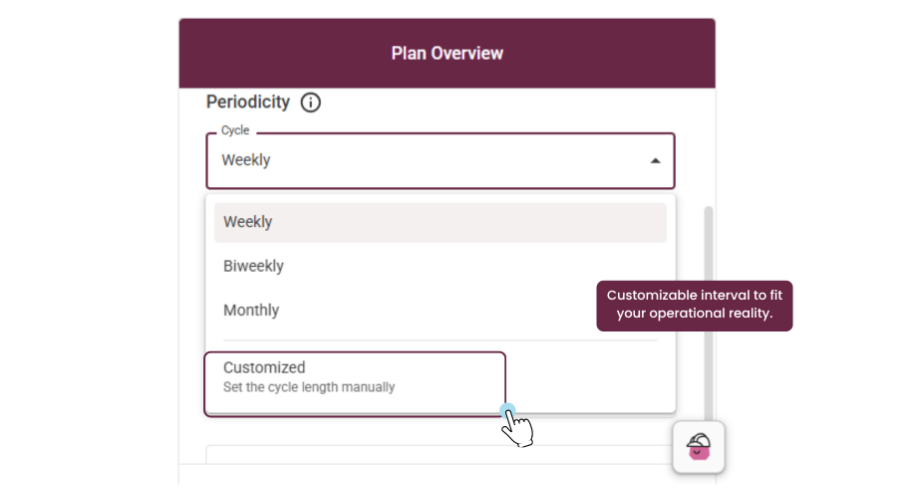
1 – Custom frequency
In addition to weekly, every two weeks and monthly, you can now set cycles from 1 to 365 days or 1 to 12 months and choose the start date.
In practice: 21-day, 45-day or quarterly routes now have adherence, pending items and due dates calculated correctly, following your operation’s actual calendar.
2 – Responsible teams
Create a team once and assign the whole team to as many plans as you need. When someone joins or leaves, all linked plans update automatically.
Assigning responsible users is now simpler, reusable and aligned with how teams actually run their analysis routes.
3 – Adherence that reflects the work of the responsible users
Plan adherence now counts only reports created or edited by the plan’s responsible users within the current cycle. Reports recorded before October 2, 2026 remain valid for all plans.
In practice: a more reliable adherence indicator for tracking both the operation and the contract.
4 – Reports at the right level, with fewer clicks
Create reports directly on subassemblies and components, with the asset already selected. You can also create or edit reports from the spot, including overdue ones. New icons show whether the spot has a valid report in the cycle, a recent history or no report at all, and the color indicates severity.
5 – Smoother execution
When you open a machine, the tree expands all the way down to the spots. The screen updates automatically with reports and statuses created in other tabs or by other users, and the open plan stays in place when you reload the page.
6 – Execution permission
Users with the Collector or Inspector profile can now execute the plans they are assigned to as responsible users, without access to configuration actions.
In practice: people who run long routes work faster and more safely, and it’s clear who configures and who executes each plan.
These improvements were designed to make your monitoring more intuitive and efficient, contributing to a more agile and clear operation in your daily routine.